In many networking setups, identifying equipment correctly is crucial — especially when dealing with PoE switches (Power over Ethernet) and non-PoE switches. Over time, stickers, serial labels, or model tags on network switches may fade or fall off, leaving IT professionals uncertain about what type of switch they’re handling.

So, how do you identify whether a switch is PoE or non-PoE without any visible labels or stickers?

In this guide, we’ll help you understand the difference between PoE and non-PoE switches, how to identify them through visual inspection, testing, and technical methods — and why it matters for your network performance.


What Is a PoE Switch?

A PoE (Power over Ethernet) switch is a network switch that provides both data and electrical power through the same Ethernet cable. This means you can power devices like:

  • IP cameras

  • VoIP phones

  • Wireless access points

  • IoT sensors

— without needing a separate power adapter or outlet near the device.

PoE switches simplify network installations, reduce cable clutter, and are ideal for modern smart offices, surveillance systems, and event setups.

What Is a Non-PoE Switch?

A non-PoE switch, on the other hand, only transmits data, not power. It requires each connected device to have its own power source.

These switches are commonly used in setups where devices like desktop computers, servers, or non-PoE access points already have their own power adapters or internal power supply.

While non-PoE switches are often more affordable, they lack the convenience of powering devices directly over Ethernet cables.


Why Identifying PoE vs Non-PoE Matters

Using the wrong switch type in your network can lead to:

  • Connectivity issues if a powered device doesn’t receive sufficient power.

  • Equipment damage if incompatible devices are connected to a PoE port.

  • Troubleshooting confusion, especially in large installations or events.

For example, connecting a PoE-powered IP camera to a non-PoE switch will not power the camera, leading to confusion during setup.

Knowing how to identify whether a switch is PoE or non-PoE — even without labels — saves time, prevents hardware damage, and ensures efficient configuration.

How to Identify PoE and Non-PoE Switches Without Stickers or Labels

If you have an unmarked or unlabelled switch, here are several methods to identify whether it’s PoE or non-PoE.


1. Check the Switch Ports for Power Indicators

Most PoE switches have LED indicators near their Ethernet ports that light up when power is being delivered to a connected device.

You can identify them by:

  • Connecting a PoE-compatible device (like an IP phone or camera) directly to the port.

  • Watching for LED indicators that show “PoE active” or “power output.”

  • Some switches have yellow or orange LEDs specifically for PoE activity.

If no LED lights up or the connected device doesn’t power on, the port is likely non-PoE.

2. Look at the Power Connectors

Inspect the rear panel of the switch:

  • PoE switches often have a larger internal power supply or heavier AC adapter, because they deliver additional power to connected devices.

  • Non-PoE switches typically have smaller or lighter power supplies.

If your switch has a DC input adapter, it might be a non-PoE model, since most PoE-capable switches require higher wattage via AC input.


3. Test with a Known PoE Device

The simplest method is to connect a PoE-compatible device, such as a VoIP phone, IP camera, or wireless access point.

If the device powers on using only the Ethernet connection, the switch is a PoE switch.
If not, it’s a non-PoE switch — and you’ll need a PoE injector or external power adapter for that device.

⚠️ Note: Always test using low-power PoE devices first to avoid potential compatibility issues.

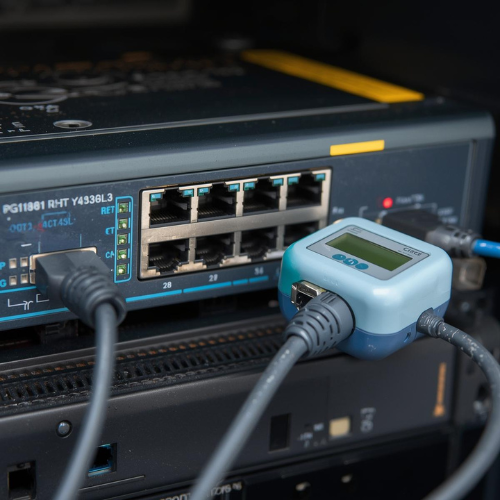
4. Use a PoE Tester or Detector

A PoE tester is a small, affordable tool used to check if a network port is delivering power.

Here’s how to use one:

  1. Connect the tester to a switch port using a standard Ethernet cable.

  2. The tester will indicate whether PoE is present and display voltage levels (usually 48V DC for standard PoE).

  3. If there’s no voltage output, the switch is non-PoE.

This is one of the safest and most accurate ways to identify PoE capability without guessing.


5. Check the Port Labeling (if Partially Visible)

Even if stickers are missing, many switches have engraved port markings on the chassis. Look closely around the Ethernet ports — you might notice small labels like:

  • PoE

  • PoE+

  • Uplink

  • 48V

  • 802.3af/at

These indicate that the port supports Power over Ethernet. If you only see simple port numbering (1, 2, 3, etc.) with no power reference, it’s likely a non-PoE switch.

6. Observe the Weight and Build of the Switch

PoE switches are typically heavier because they contain larger internal transformers and power circuitry to supply energy to multiple ports.

In contrast, non-PoE switches are lighter and more compact since they only handle data transmission.

While this isn’t a definitive test, it’s a good secondary indicator when combined with other clues.


7. Identify by Model Shape or Port Layout

If you recognize the design, port layout, or fan placement, you might match the switch to known models online.

For instance:

  • Cisco Catalyst PoE switches often have a thicker chassis and additional ventilation.

  • Cisco non-PoE models are slimmer and sometimes fanless.

You can compare these features on the official Cisco site or rental listings like RebuyIT’s Cisco Switch Catalog to identify the likely model.


8. Connect to the Switch Console (Advanced Method)

If you can access the switch console via a console cable or SSH, you can verify its PoE capability using command-line interface (CLI) commands.

PoE Switch vs Non-PoE Switch: Key Differences

FeaturePoE SwitchNon-PoE Switch
Power DeliveryProvides data + power over Ethernet cableProvides data only
Setup ComplexityEasier – no need for separate power adaptersRequires external power for devices
Ideal ForIP cameras, VoIP phones, access pointsPCs, printers, and non-PoE devices
CostSlightly higherLower
Power SourceCentralized (switch-based)Individual power adapters
MaintenanceEasier, fewer cablesMore complex cabling

Why PoE Switches Are Becoming More Popular

With the rise of smart offices, IoT systems, and remote monitoring, PoE switches are becoming the preferred choice for businesses. They:

  • Simplify installations (only one cable per device)

  • Enable remote device control and monitoring

  • Reduce clutter and cabling costs

  • Support flexible placement of devices (no wall socket required)

At RebuyIT, we offer a full range of PoE and non-PoE Cisco switches for rent, making it easy for businesses to choose the right equipment for their networking needs.

👉 Explore PoE Switch Rentals at RebuyIT


When to Choose Non-PoE Switches

Non-PoE switches are still a great option when:

  • Your connected devices already have power adapters.

  • You want a cost-effective network expansion.

  • Power delivery isn’t required through Ethernet.

  • You’re working with devices like PCs, printers, or legacy systems.

They are simpler, affordable, and efficient for standard office networks.


Final Thoughts

Identifying a PoE switch or non-PoE switch without any labels can seem challenging at first — but with the right methods, it’s easy to determine what type of device you’re dealing with.

By using tools like PoE testers, observing physical features, or connecting a PoE-compatible device, you can quickly tell whether your switch supports Power over Ethernet.

At RebuyIT, we help businesses across India rent, configure, and deploy both PoE and non-PoE switches from trusted brands like Cisco — all tested, certified, and ready for immediate use.

Whether you’re setting up a new network or replacing old infrastructure, our experts provide flexible rentals, technical support, and PAN India service to keep your operations running smoothly.

👉 Check out our range of PoE and Non-PoE Cisco Switches here:
RebuyIT – Cisco Switch Rentals


About RebuyIT:
RebuyIT is India’s first IT rental and technical support company, offering Networking Equipment, Servers, Storage, Workstations, Laptops, and Spares for rent. With PAN India delivery, certified quality testing, and 24/7 support, RebuyIT ensures your business gets enterprise-grade technology — without the high upfront costs.


Author

rebuyitsolution@gmail.com
Total post: 15

Leave a Reply

Your email address will not be published. Required fields are marked *